Travel statistics
Travel statistics that explain how you fly
Once your flights are logged, YourFlights turns raw history into meaningful travel statistics. See how far you have flown, which airlines and aircraft dominate your map, how your habits change year over year, and which airports you keep returning to—all in charts designed for quick reading.
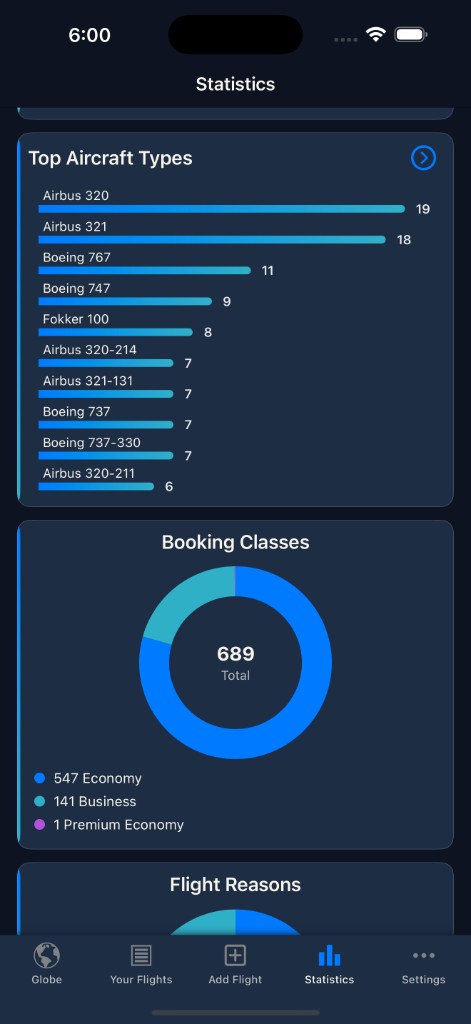
From flight stats to travel insights
Lists tell you what happened; statistics tell you what it means. YourFlights aggregates your flight logbook into dashboards that answer everyday questions: How far have I flown this year? Which airline do I use most? How many airports have I touched? How has my aircraft mix changed since I started long-haul travel?
The goal is not vanity numbers—it is pattern recognition. Travel statistics help you plan status runs, compare seasons, or simply appreciate how much ground (and air) you have covered.
Metrics frequent flyers actually check
Distance & time
Track kilometers or miles flown and time in the air with yearly totals and lifetime summaries—core outputs for any distance flown tracker.
Airport & country coverage
See how your map of visited airports grows, including first-time visits each year.
Airline statistics
Compare share of flights and distance by carrier, useful when you chase alliance benefits or corporate contracts.
Aircraft types
Understand whether you fly narrowbody, widebody, or regional jets most often—popular with aviation enthusiasts.
Cabin & booking class
Chart economy, premium, and business mix when you log cabins consistently.
Year-over-year trends
Spot rebounds after quiet years or gradual shifts when work travel changes.
Charts designed for quick reading
Dense tables are hard to scan on a phone. YourFlights uses clear visualizations—bar charts, breakdowns, and summary cards—so you can open the app between connections and still learn something. Statistics stay tied to the same data that feeds your route globe: one source of truth, multiple lenses.
When you add a missing aircraft type or fix an airport code in the logbook, charts refresh automatically. No manual export to a spreadsheet, no fragile formulas—just an up-to-date picture of your flying life.
Turn stats into stories
Numbers become memorable when they connect to places. Pair statistics with globe exploration: filter a year, see routes light up, then return to charts to quantify the same period. Many members review end-of-year totals before choosing goals for the next—new airport, new airline, or a mileage milestone.
If you are rebuilding history, import past flights first so statistics reflect your full story, not just recent trips.
Privacy and ownership of your data
Your personal travel statistics are computed from your full logbook, and per-flight visibility controls who can see each flight as an individual entry on your profile and feeds. Community surfaces—the global Globe and ranking—include every flight regardless of visibility, but only in anonymized aggregate (route geometry and year), never revealing your identity or per-flight details. Export remains available when you want a backup or to analyze numbers elsewhere—without locking you in.
Frequently asked questions
What travel statistics does YourFlights calculate?
Core metrics include total flights, distance flown, flight time, airports and countries visited, plus breakdowns by airline, aircraft type, cabin class, and year. Charts highlight trends so you can spot shifts in how you travel.
Do I need a premium subscription for statistics?
You can log up to ten flights on the free tier to try the app. Unlimited logging and full statistics are available through a simple in-app purchase on iOS.
How accurate is the distance flown tracker?
Distances use great-circle calculations between airport coordinates in the database, which is the standard approach for passenger flight stats and frequent-flyer style summaries.
Can statistics reflect only certain years or trip types?
Yes. Filter by year and use your logbook fields—such as flight reason or cabin—to compare business vs leisure patterns when you record them.
Where do the charts get their data?
Every chart reads from the same flight logbook you maintain. Edit a flight and your stats update—there is no separate spreadsheet to maintain.
See what your flights add up to
Log a few trips or import your full history, then open statistics to watch the charts populate. The more complete your logbook, the richer the insights.

Free to start · Syncs with your account · Import-friendly
Explore related features
Flight logbook
Log airlines, routes, aircraft, cabins, and seats in a searchable personal archive.
Learn more →Route globe
Visualize every route on an interactive 3D globe with filters and exploration tools.
Learn more →Import flights
Bring existing history from CSV, OpenFlights, or another tracker without starting over.
Learn more →